
Keep Jira, Linear, or GitHub Issues as the organization’s system of record. Use Beads as the coding agent’s local system of action.
The useful design has two levels. The hosted tracker carries roadmap commitments, ownership, discussions, approvals, and reporting. A Beads graph holds the finer work state that agents create and consume while changing code. Link the levels, and synchronize only what the team needs.
Product behavior and public documentation were reviewed July 30, 2026. Jira and Linear are rolling commercial services; GitHub Issues is part of GitHub’s hosted platform, so these details can change between dated releases.
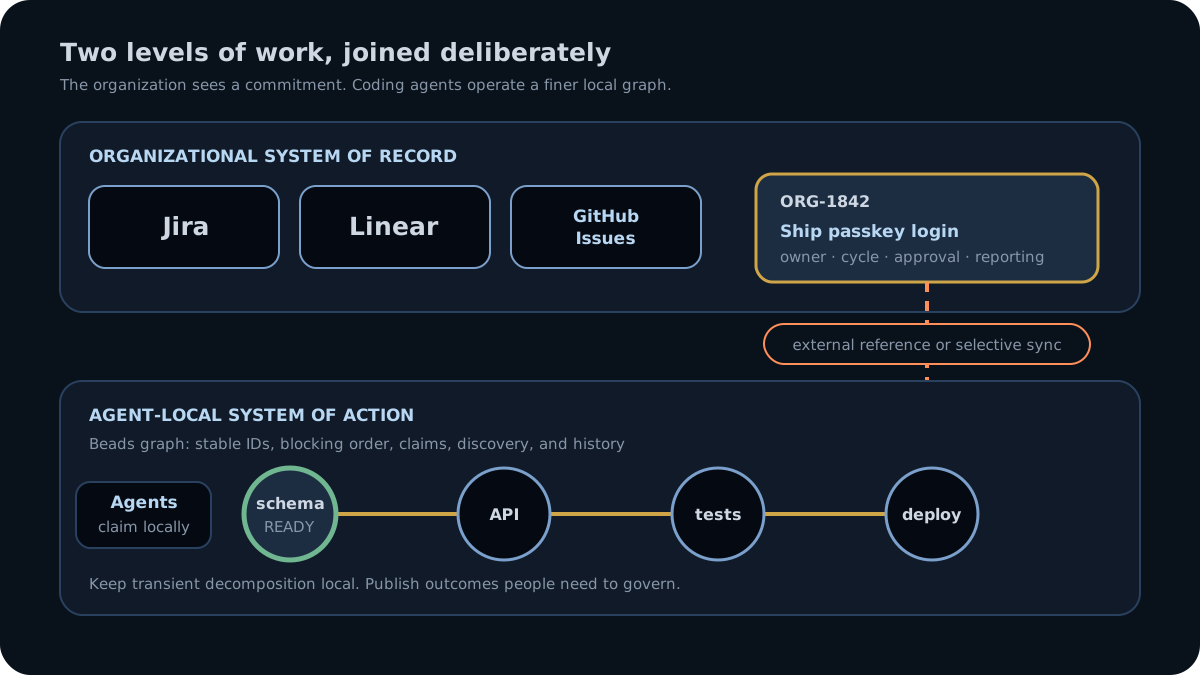
Two systems, two audiences
An organizational issue might be “Ship passkey login.” Product, design, security, support, and engineering all need to see it. The issue may carry a target cycle, owner, customer context, approvals, and cross-team discussion.
An agent execution graph beneath it might contain:
- define the credential schema;
- implement the endpoint;
- write end-to-end tests;
- update sign-in documentation;
- fix the session flag discovered during endpoint work.
Publishing every agent-discovered subtask into the company tracker can bury humans in machine churn. Keeping the whole feature in one organizational issue leaves agents without explicit blockers, claim state, and durable discovery trails. The two-level model keeps each audience at the right resolution.
Give each layer one job
| Responsibility | Jira / Linear / GitHub Issues | Beads |
|---|---|---|
| Portfolio and roadmap visibility | Core strength, especially Jira and Linear | Not the OSS product’s job |
| Cross-functional discussion | Built for human teams and notifications | Work notes stay close to agent execution |
| Permissions and organization policy | Mature hosted account controls | Team-wide governance belongs to the Beads Team Server preview |
| Coding-agent latency | Network API or MCP round trip | Local CLI and database |
| Work hierarchy | All three support parent/child forms | Parent/child graph edges |
| Blocking relationships | Supported in current products | Typed blocking edges drive readiness |
| Dependency-ready frontier | No universal documented atomic ready-and-claim operation | bd ready plus atomic claiming |
| Local crash survival | Hosted issue remains; local session detail may not | Work state and history remain in the local graph |
| Fine-grained discovered work | Possible, but can create organizational noise | discovered-from keeps provenance inside execution |
| Machine coordination | Central hosted service | Dolt remote or server mode |
The hosted trackers are increasingly agent-aware. Their new agent features make the layering decision more flexible; they do not make local execution detail disappear.
Jira: strongest for governed organizational work
Jira Cloud supports subtasks and configurable work-item hierarchies, linked issues, boards, JQL, assignment, automation, and an administrative audit log. Atlassian also offers the Rovo MCP server and documents collaboration with coding agents on work items.
That makes Jira a credible surface for giving an agent an organizational assignment. It remains optimized for the company record: workflows, reporting, access controls, notifications, and human review. API latency and project configuration come with that power.
Choose Jira as the only task layer when the agent work is coarse, centrally assigned, and must follow existing corporate workflows. Add Beads when agents decompose that issue into a changing execution graph or need to pull dependency-ready work locally.
Jira’s subtask documentation and audit-log documentation describe the current organizational model. Atlassian warns that deleted work cannot be restored without an external backup or export, so hosted does not mean every destructive action is reversible.
Linear: a fast human tracker with native agent concepts
Linear has parent and sub-issues, blocked and blocking relations, workflow automation, APIs, and webhooks. Its agent surface is unusually explicit: official MCP support, agent users, and coding sessions that can run Claude or Codex from an issue.
For teams already operating in Linear, that may cover the whole workflow. A person assigns a well-scoped issue, the coding session does the work, and the result returns to the same product surface.
Beads becomes useful when the coding session itself needs a persistent subgraph: work discovered mid-run, blocking order between several agents, atomic claims, or a local record that can continue after the hosted session and model context are gone. Linear preserves issue activity and description history, and its deletion policy allows deleted issue recovery for 30 days. Beads adds a version-controlled execution history at the repository layer.
GitHub Issues: closest to the code-hosting workflow
GitHub Issues has become a structured tracker. Current GitHub documentation describes sub-issues up to eight levels deep and blocking dependencies. Projects add fields, views, and filters. The official GitHub MCP server gives agents issue and repository operations, and GitHub documents assigning issues to coding agents.
For an open-source project or a small team whose planning already lives next to pull requests, GitHub Issues may be enough. It minimizes the number of products a contributor must visit.
The gap appears in local execution. GitHub documents issue assignment and dependency fields, but not a universal operation that computes all dependency-ready work and claims one atomically for an arbitrary agent pool. Deleted issues are permanently deleted. Beads keeps fast, repository-local agent state and database history while GitHub remains the public collaboration record.
How to connect the levels
Start with the lightest useful link: store the Jira, Linear, or GitHub URL as the bead’s external reference, and put the Beads epic ID or repository link in the organizational issue. That gives both audiences a path across the boundary without inventing a synchronization policy.
Beads currently documents tracker-specific commands:
bd jiracan pull, push, or synchronize selected issues, with dry runs and conflict preferences.bd linearsupports pull, push, relations, state mappings, selected teams, staleness checks, and conflict preferences.bd githubsupports bidirectional, pull-only, push-only, and selective synchronization.
Begin with a narrow synchronization policy. Decide which fields cross the boundary, which side owns them, and which kinds of work stay local. A good default is to synchronize milestones or externally meaningful outcomes while leaving transient agent decomposition in Beads.
Run a dry run before enabling writes. Conflict preferences such as “prefer local,” “prefer Jira,” or “prefer newer” are policy decisions; the CLI cannot decide which record your organization considers authoritative.
The operating rule
Use the hosted tracker for work that the organization promises, funds, reviews, or reports. Use Beads for work that agents must safely claim, block, discover, resume, and hand off.
For the local model, read Why coding agents need a work graph. For direct alternatives to Beads, see Top agent work management systems compared.
Start with one organizational issue and one linked Beads epic. Decide which fields cross the boundary, run each tracker integration in dry-run mode, and inspect the proposed changes before allowing either system to write the other.
Related articles
- Beads: Understand the durable local work layer beneath the organizational record.
- Task management for coding agents: Decide whether the immediate job is human reporting or agent execution state.
- Why coding agents need a work graph: See what the local graph adds beneath a coarse organizational issue.
- Enterprise multi-agent orchestration: Evaluate the team boundary when shared governance must move beyond linked local graphs.